
Skip to content
ProDroidTech
Menu
  • Home
  • app-reviews
  • AI & Automation
  • smart devices
    • AndroidTV
    • Firestick
    • BoxTV
    • GoogleTV
  • More Categories
    • Top Lists & Recommendations
    • Tech Tutorials
    • Top 10 AI Tools That Failed Creator
    • Free Tools
  • Contact
  • About Us
Menu

How to use feature-rich office suites on Android devices

Posted on November 29, 2025December 30, 2025 by mebech33
WPS Office Guide Guide
By ProDroidTech Editorial • Nov 27, 2025

WPS Office — Complete 2025 Guide: Install, Use & Master WPS on Android & Desktop

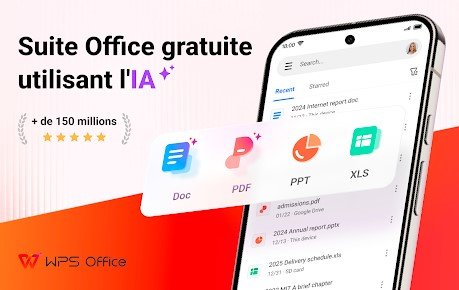
WPS Office is one of the most feature-packed, lightweight office suites available on Android, Windows, macOS and Linux. It offers a full set of tools — Writer, Spreadsheets, and Presentation — plus cloud integration, PDF editing, and extensive compatibility with Microsoft Office formats. This guide covers everything: installing, configuring, advanced workflows, comparisons, pros & cons, and troubleshooting.
Platform
Android • Windows • macOS • Linux • Web
Free tier
Yes — with premium upgrades
Why WPS?

Lightweight, highly compatible with DOCX/XLSX/PPTX, strong mobile experience and integrated PDF tools.


Overview — What is WPS Office?

WPS Office, developed by Kingsoft, is an all-in-one office suite that aims to combine the familiarity of Microsoft Office with a compact, mobile-friendly experience. The suite includes Writer (word processor), Spreadsheet (data & tables), Presentation (slides), and built-in tools for PDF reading, conversion and annotation. On Android, WPS places a premium on touch usability — ribbon-style toolbars scaled for mobile, one-tap templates, and cloud sync features. On desktop, it offers strong file compatibility and an interface many users find intuitive. One of WPS’s strongest selling points is its balance: it remains significantly lighter than many full desktop suites while still supporting advanced features: pivot-like functionality, multiple formula types, smart art and transitions, and export to PDF. For users seeking a reliable, low-resource office solution across devices, WPS is often a top choice.

Key Features

  • Full Office Suite: Writer, Spreadsheet, Presentation — all compatible with DOCX/XLSX/PPTX.
  • Small footprint: Optimized for mobile, fast to install and runs well on older devices.
  • Built-in PDF tools: View, convert (PDF ⇄ Word), annotate, and compress PDFs directly inside the app.
  • Templates & cloud: Hundreds of templates and support for cloud services and WPS Cloud.
  • Collaboration: Share files, comment, and use cloud links for collaborative editing and sharing.
  • Advanced formulas & charts: Robust spreadsheet engine with many built-in functions and chart types.

Integration & compatibility

WPS prioritizes format compatibility — opening and saving Microsoft Office formats reliably. For environments where cross-platform document fidelity matters (e.g., shared business documents), WPS minimizes formatting glitches and supports export options to ensure recipients see the right layout.

Install & Setup — Step-by-step

Android (Play Store)

Open Google Play → search “WPS Office” → tap Install. After installation, open the app and sign in (optional) to enable sync with WPS Cloud and access templates. Grant storage permissions to allow saving and opening local documents.

Windows / macOS

Visit WPS Office official site or download via the Microsoft Store / App Store. Run the installer and follow prompts. Choose the free plan or a premium subscription for extra cloud storage and advanced PDF features.

Configuration tips

  • Enable auto-save to cloud for critical documents.
  • Set default file locations (local or cloud) in settings.
  • Customize the toolbar to keep frequently used tools handy.

How to Use WPS — Practical Workflows

Writer — Creating a polished document

Open Writer → choose a template or blank document. Use the toolbar to apply styles, headings, and insert images. To create a table of contents: apply heading styles to sections, then Insert → Table of Contents. Save as DOCX or export to PDF via File → Export.

Spreadsheet — From basic tables to analytics

Create a new Spreadsheet, enter headers and values, and use built-in functions (SUM, VLOOKUP, CONCATENATE) to analyze data. Use conditional formatting to highlight rows and create charts via Insert → Chart to visualize trends. For larger datasets, consider filtering and creating pivot-style summaries using group and subtotal functions.

Presentation — Slide design & export

Choose a presentation template, add slides, and use Master slides to keep branding consistent. Include transitions sparingly and export to PPTX or PDF for sharing. On mobile, use presenter notes and remote control features for easy delivery.

Working with PDFs

Open a PDF to read, annotate, or convert. Use the Convert feature to create an editable Word document (DOCX), or compress to reduce file size before sending. Note: advanced OCR and PDF editing features may require paid premium.

Advanced Tips & Power Workflows

Power users can extend WPS with these approaches: use templates and macros to automate repetitive tasks; in Spreadsheets, create named ranges for complex formulas and use array formulas for batch calculations. On desktop, enable multiple monitor support and split view for multi-document workflows. For teams, leverage cloud links and shared folders to centralize assets. For performance: disable heavy animations on older devices, limit the number of active add-ons, and use compressed images (WebP/JPEG) to reduce document bloat. When collaborating between WPS and Microsoft Office users, export a PDF or confirm that fonts are embedded to avoid layout shifts.

Pros & Cons — Quick Summary

Pros

  • Lightweight and fast on mobile devices.
  • Excellent Microsoft Office compatibility.
  • Built-in PDF tools (view, convert, annotate).
  • Free tier with many features; cross-platform.

Cons

  • Some advanced PDF and collaborative features are behind paywalls.
  • Occasional bundled offers/ad prompts in the free version.
  • Privacy-conscious users may prefer fully open-source alternatives for data hosting.

Deep Analysis — WPS Office (2025)

Category Details
Compatibility High compatibility with DOCX/XLSX/PPTX; reliably opens MS Office files with minimal layout changes.
Performance Very lightweight on Android and Windows; loads quickly and consumes less RAM than many alternatives.
Features Comprehensive suite with PDF editing, templates, cloud sync, and collaboration tools—covers most user needs.
Mobile Experience Optimized UI for touch; excellent mobile editing experience with templates and one-tap formatting.
Security & Privacy Standard encryption in transit and at rest for cloud features. Users requiring zero-knowledge may need third-party encryption.
Cost Free tier covers many features; premium plans unlock advanced PDF editing, extra cloud storage, and ad-free experience.

Troubleshooting — Common Problems & Fixes

Crash or freeze

Clear the app cache (Android Settings → Apps → WPS Office → Storage → Clear cache). If problem persists, update to the latest version or reinstall. On desktop, check available disk space and close other memory-hungry apps.

Formatting issues when opening DOCX

Use the export-to-PDF option on the creator’s side when sharing complex layouts. In WPS, enable font substitution if a specific font is missing and embed fonts when exporting.

PDF conversion problems

For OCR-heavy PDFs, use the premium OCR features or convert via a dedicated OCR tool if complex scanned pages are involved.

Quick Setup Tips

  • Sign in to sync settings across devices.
  • Enable auto-save for important files.
  • Install desktop fonts to preserve layout when editing

Available on Android, Windows, macOS, Linux and Web.

Mini FAQ

Is WPS Office really free?
Yes — a generous free tier is available. Premium subscriptions unlock advanced PDF and cloud features.
Will my DOCX look the same?
Mostly yes. WPS excels in compatibility but embedding fonts and testing complex layouts is recommended.

FAQ — WPS Office

Can I use WPS for professional documents?
Yes. WPS supports professional-grade templates, advanced formatting, track changes, and PDF export suitable for business use.
Is there collaboration (multiple users editing)?
WPS supports cloud links and basic collaborative features. For simultaneous live editing, verify plan features or consider an integrated cloud collaboration platform.
How secure is WPS Cloud?
WPS uses standard encryption in transit and at rest. For highly sensitive documents, consider encrypting files before upload or using private cloud solutions with zero-knowledge encryption.
Does WPS include templates?
Yes — hundreds of templates across document types (resumes, invoices, presentations) are accessible inside the app.

Conclusion — Is WPS Right for You?

WPS Office is an excellent choice for users who want a lightweight, cross-platform office suite that offers strong Microsoft Office compatibility and practical mobile tools. It’s a particularly good fit for students, freelancers, and small-business users who need a fast, low-resource solution without sacrificing core functionality. If advanced PDF editing or enterprise collaboration is critical, evaluate the premium tier or compare with cloud-native suites. Overall, WPS balances features and performance in a way few alternatives do in 2025.

Get WPS Office

Play Store
Download Get the App
Last updated: Nov 23, 2025 — ProdroidTech

Recent Posts

  • Boost Your Productivity with Simple Automated Workflows
  • Boost your productivity with simple automated tasks
  • How to promote and sell products directly through the TikTok Shop
  • Top technology news emerging technologies and tools innovative
  • The best digital tools smart solutions for boosting productivity automation

Recent Comments

No comments to show.

Archives

  • February 2026
  • January 2026
  • December 2025
  • November 2025
  • October 2025
  • May 2025

Categories

  • AI & Automation
  • AndroidTV
  • app-reviews
  • best Android apps
  • Blog
  • Blogging
  • BoxTV
  • Category
  • Firestick
  • Free Tools
  • GoogleTV
  • How-To Fix & Tech Solutions
  • Smart Devices
  • Tech Deals & Offers
  • Tech News & Trends
  • Tech Tutorials
  • Top 10 Free AI Video
  • Top Lists & Recommendations
  • Uncategorized
About Us
Privacy Policy
Contact Us
Disclaimer
Terms & Conditions
cookie-policy
About Us
Privacy Policy
Contact Us
Disclaimer
Terms & Conditions
cookie-policy

© 2025 ProDroidTech. All rights reserved.

©2026 ProDroidTech | Design: Newspaperly WordPress Theme
Review Your Cart
0
Discount
Add Coupon Code
Subtotal
Total Installments (before discounts)
Bundle Discount
Checkout
0

Notifications