
Reminders App: Set Time-Based Alerts with Google Calendar Integration
In today’s fast-paced digital world, remembering everything manually is no longer realistic. Deadlines, meetings, personal commitments, and daily habits all compete for attention. This is where reminder applications with time-based alerts become essential productivity tools.
When combined with Google Calendar integration, reminders evolve from simple notifications into a fully connected planning system. Tasks, events, and alerts stay synchronized across devices, ensuring that nothing important is missed.
What Is a Reminder App with Google Calendar Integration?
A reminder app is a digital tool designed to notify users about tasks, events, or actions at a specific time or date. When integrated with Google Calendar, reminders can automatically align with scheduled events, deadlines, and recurring activities.
This integration allows users to see reminders directly inside their calendar view while also receiving timely alerts across phones, tablets, desktops, and smart devices.
Core Features of a Modern Reminder App
1. Time-Based Alerts
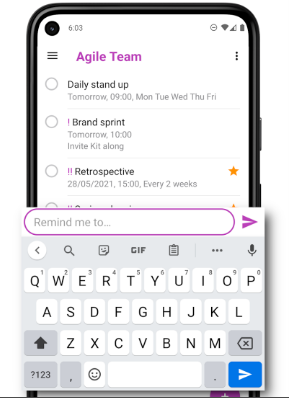
Users can schedule alerts for specific times and dates, ensuring important tasks are never forgotten. Advanced apps allow multiple alerts for the same reminder.
2. Google Calendar Synchronization
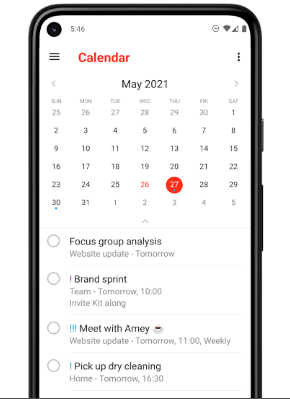
Reminders sync automatically with Google Calendar, allowing tasks and events to coexist in one timeline. Changes made in one place reflect everywhere.
3. Recurring Reminders
Perfect for habits, subscriptions, bills, and routine tasks. Daily, weekly, monthly, or custom recurrence patterns are supported.
4. Cross-Device Notifications
Alerts appear on smartphones, desktops, smart TVs, and connected devices, ensuring reminders are always visible.
5. Simple & Clean Interface
Minimalist design helps users focus on tasks rather than complex settings.
Practical Use Cases
- Work & Business: Meeting reminders, deadlines, follow-ups
- Personal Life: Birthdays, appointments, medication alerts
- Education: Study schedules, assignment deadlines
- Smart Homes: Family reminders displayed on shared screens
- Health & Habits: Exercise routines, hydration reminders
Feature Analysis Table
| Feature | Description | Productivity Impact |
|---|---|---|
| Time-Based Alerts | Notify users at precise moments | Very High |
| Google Calendar Sync | Unified task & event planning | Excellent |
| Recurring Tasks | Automates routine reminders | High |
| Cross-Device Support | Alerts across all platforms | High |
| Smart Notifications | Context-aware alerts | Medium |
Pros & Cons
Pros
- Prevents missed tasks and deadlines
- Seamless Google Calendar integration
- Improves daily time management
- Simple and intuitive interface
- Works across multiple devices
Cons
- Requires internet for real-time sync
- Too many alerts can cause notification fatigue
- Limited customization in basic versions
- Advanced features may require premium plans
Best Practices for Using Reminder Apps Effectively
- Use clear and concise reminder titles
- Avoid setting too many alerts at once
- Sync reminders with real calendar events
- Review reminders daily or weekly
- Combine reminders with task prioritization
Conclusion
Reminder apps with time-based alerts and Google Calendar integration are powerful tools for anyone seeking better organization and productivity. By automating memory and scheduling tasks, these apps free mental space for more meaningful work.
Whether for personal life, business, or shared environments, integrating reminders with a calendar system ensures that important moments are never overlooked. When used wisely, reminders become silent assistants that keep life running smoothly.


