✍️Introduction
Android TV has transformed the way people consume entertainment, turning regular TVs into smart hubs for streaming, gaming, and browsing. However, many users face recurring Android TV problems that disrupt the viewing experience. From slow performance and app crashes to storage issues and network problems, these issues stem from both hardware and software limitations. In this article, we’ll explore the most common Android TV issues and break down the main causes behind them.
1. Slow Performance on Android TV
One of the biggest Android TV problems users report is slow performance. Over time, the system becomes sluggish, menus take longer to load, and apps respond slowly.
Causes of Slow Performance
- Limited RAM and processing power in budget devices.
- Too many apps running in the background consuming resources.
- Outdated software that lacks optimization.
- Storage nearly full, affecting system speed.
2. Frequent App Crashes
App crashes are among the most frustrating issues. Applications like YouTube, Netflix, or IPTV services often freeze or shut down unexpectedly.
Causes of App Crashes
- Poor compatibility between apps and the Android TV operating system.
- Excessive memory and CPU usage.
- Incomplete or buggy updates released by app developers.
- Corrupted cache files within the application.
3. Limited or Missing Software Updates
Unlike smartphones, many Android TV devices rarely receive consistent updates.
Causes of Update Problems
- Manufacturers abandon older models quickly.
- Low-cost brands rarely invest in long-term software support.
- Security and compatibility patches are delayed or ignored, leading to persistent bugs.
4. Android TV Network Problems
Another widespread issue is network connection problems, especially with Wi-Fi. Users complain about buffering, weak signals, or complete disconnections.
Causes of Network Problems
- Weak or low-quality Wi-Fi chips in cheaper Android TV boxes.
- Interference from other devices on the same frequency.
- Outdated firmware causing instability in network handling.
- Inconsistent ISP connection that the TV cannot stabilize.
5. App Compatibility Issues on Android TV
Not every Android app works seamlessly on Android TV.
Causes of Compatibility Problems
- Apps designed for smartphones do not scale properly on larger TV screens.
- Missing dependencies required for Android TV hardware.
- Lack of official support from app developers for Android TV OS.
6. Storage Issues on Android TV
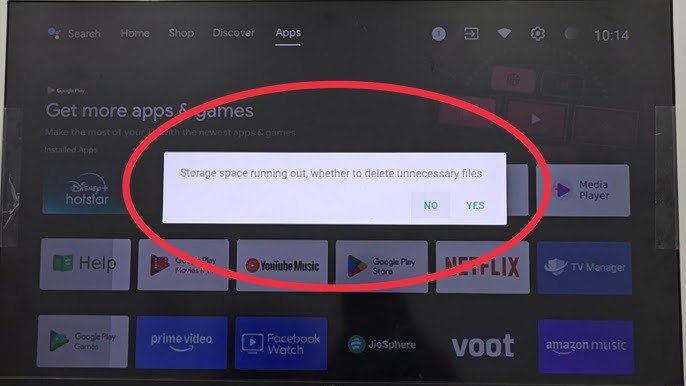
Storage issues are a constant challenge, especially for users who install many streaming and media apps.
Causes of Storage Problems
- Limited internal memory (sometimes as low as 8GB).
- Large apps like Netflix or games consuming huge space.
- System updates taking up storage, leaving little for user apps.
- Cache buildup that eats available storage over time.
7. Display and Audio Problems
Users frequently face display glitches or audio sync problems that ruin the entertainment experience.
Causes of Display and Audio Issues
- Wrong resolution scaling leading to black screens or distorted images.
- Hardware limitations in handling HDR, Dolby Vision, or 4K playback.
- HDMI connection problems between the Android TV box and the TV.
- Poor audio processing causing lag or desynchronization.
8. Remote Control and Voice Assistant Failures
The Android TV remote is another common source of frustration. Many users report laggy input, unresponsive buttons, or voice commands not working.
Causes of Remote Control Problems
- Weak Bluetooth connectivity leading to disconnections.
- Low-quality batteries or power issues.
- Microphone sensitivity too low for accurate voice search.
- Google Assistant server errors causing failed recognition.
Conclusion
While Android TV devices bring powerful smart features to the living room, they also suffer from recurring issues. The most common Android TV problems—including slow performance, app crashes, storage issues, network errors, display glitches, and remote failures—are often caused by limited hardware resources, poor app optimization, or lack of consistent software updates.
Related Topic